
Why task lists grow faster than your schedule
Most backlogs don’t become overwhelming because you stop working. They grow because your planning system allows “unscheduled work” to accumulate in a separate place from where your time actually lives. A task manager can hold an infinite number of items; your calendar cannot. When those two drift apart, you end up with a list that feels productive (it’s organized) but is functionally un-doable (it isn’t time-resourced).
The Anti-Backlog Sprint is a simple practice to prevent that drift: a 20-minute daily “calendar sweep” that forces tasks to compete for real time. It’s not a weekly overhaul, not a quarterly reset, and not a complex methodology. It’s a daily, bounded routine that keeps your commitments honest and keeps your backlog from silently ballooning.
What the Anti-Backlog Sprint is
The Anti-Backlog Sprint is a 20-minute block you schedule every workday (or at least on your heavy-meeting days). During that block, you scan your calendar and make quick decisions so that:
- Tasks that matter are scheduled, not merely listed.
- Time conflicts are surfaced early, while options still exist.
- New inputs (emails, notes, meeting follow-ups) don’t pile up as “later” items.
Calling it a “sprint” is intentional. You’re not trying to perfect the whole system. You’re trying to keep it from drifting. The goal is steady pressure against backlog growth, not one heroic cleanup.
Set it up as a recurring 20-minute calendar block
Schedule the sweep at a time that reflects how your day actually behaves:
- Morning (before meetings): Best if your calendar fills quickly and you need to protect focus time.
- Midday: Useful if mornings are reactive and you want a reset after the first wave of meetings.
- End of day: Best if you capture lots of follow-ups and want to shape tomorrow while context is fresh.
Keep the block short. Twenty minutes is long enough to make decisions, short enough that you’ll keep showing up. The consistency matters more than the exact time.
The calendar sweep workflow in four passes
This is the core: the same passes every day, in the same order, so you don’t spend your planning time deciding how to plan.
Pass 1: Read the calendar like a capacity report
Start by scanning today and the next one to two workdays. You’re looking for capacity, not details. Identify:
- Hard commitments (meetings, deadlines, live reviews).
- Soft commitments (focus blocks you can move if needed).
- Hidden constraints (travel time, prep time, context switching, recovery time).
If your calendar has meetings back-to-back, that’s already a signal: your system is at risk of producing more tasks than time.
Pass 2: Pull in new inputs and convert them into decisions
Backlogs explode when new inputs sit unprocessed. During the sweep, capture only what has changed since the last sweep:
- Meeting notes with action items
- Slack or email requests that became real work
- Ideas you wrote down during execution time
Then apply a simple rule: every new item becomes one of three things—scheduled, delegated, or dismissed. If you keep “captured but undefined” items, you are implicitly choosing backlog growth.
Pass 3: Time-block the tasks that must happen
Now pick the small number of tasks that actually deserve time on the calendar. Don’t try to schedule everything—schedule the work that creates leverage or prevents risk.
- Convert tasks into blocks: If it needs focus, it needs a block.
- Right-size the duration: Default to 25–45 minutes for many tasks. Oversized blocks encourage avoidance.
- Add a prep buffer when needed: A 30-minute meeting often requires 10 minutes of prep and 5 minutes of notes.
This is where a combined calendar + tasks workspace reduces friction. In Routine, tasks can be treated as schedulable actions rather than separate backlog inventory, which makes the “schedule it or it doesn’t exist” rule easier to maintain.
Pass 4: Remove or renegotiate time conflicts immediately
The sweep ends with conflict resolution. If the calendar is full but the task is important, you have only a few honest options:
- Move a focus block to a realistic slot (not an imaginary one).
- Reduce scope so the work fits the time you actually have.
- Renegotiate a deadline while there’s still goodwill.
- Delegate with clear ownership and a follow-up checkpoint.
- Defer intentionally by scheduling a future block (not by leaving it in a list).
Importantly, you’re not “failing” when you move something. You’re aligning commitments with capacity—what planning is supposed to do.
Rules that keep the sprint from turning into another backlog
Many planning habits fail because they quietly expand. These constraints prevent that.
- Hard stop at 20 minutes: If you can’t resolve everything, schedule a longer weekly planning block. Don’t let the daily sweep sprawl.
- No reorganizing for aesthetics: The goal is decision-making, not perfect labels, tags, or folders.
- Only schedule the next 1–2 days in detail: Beyond that, you’re guessing. Use placeholders for future work, not precise blocks.
- One “catch-up” block maximum: If you keep adding catch-up blocks, you’re masking a capacity issue. Fix the inputs or renegotiate work.
What to do with tasks that don’t fit
The Anti-Backlog Sprint is not about cramming more into the day. It’s about keeping your system truthful.
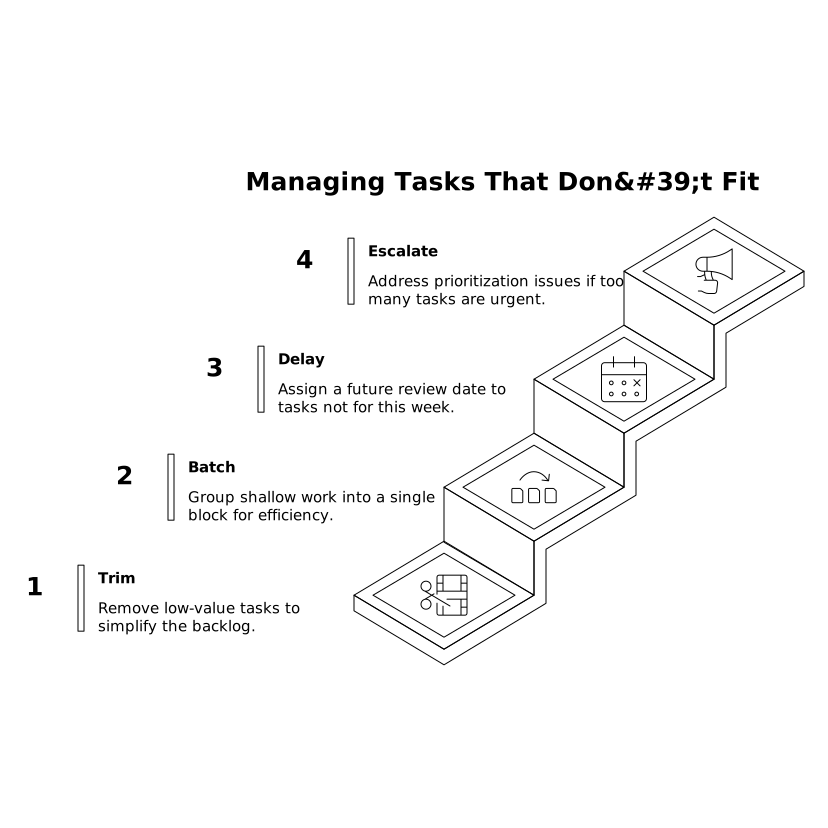
If tasks don’t fit, use this hierarchy:
- Trim: Remove low-value tasks that are only there because they were once mentioned.
- Batch: Group shallow work (approvals, small replies) into a single block.
- Delay with a date: If it’s not for this week, give it a real future review point.
- Escalate: If too much is urgent, the issue is prioritization, not productivity.
This is also where “trustworthy visibility” matters in teams. If work is hidden in personal lists, it looks like it doesn’t exist. Systems that support shared agendas and notes can reduce silent overload; the same principle shows up in product design as well, similar to how role-based visibility can build trust in enterprise feedback loops.
Make it stick with a lightweight checklist
To keep the sweep repeatable, use a short checklist you can complete without thinking:
- Scan today + tomorrow for capacity and meeting clusters
- Capture new inputs since last sweep
- Schedule 1–3 highest-leverage tasks
- Resolve conflicts (move, reduce, delegate, renegotiate)
- End on time
If you want a deeper complement to this habit for technical teams, the same “capacity-first” thinking shows up in system design: you stabilize throughput by respecting limits rather than stacking more work in a queue, as described in concurrency-safe internal automations with rate limits and backpressure.
How to tell it’s working
You’ll notice progress quickly if you track a few signals:
- Fewer surprise late nights: because conflicts are exposed earlier.
- A smaller active task list: because only schedulable tasks stay “alive.”
- More predictable follow-through after meetings: because actions are placed into time, not dumped into a backlog.
- Less guilt-driven planning: because your calendar reflects what you can actually do.
The Anti-Backlog Sprint isn’t about being more intense. It’s about keeping tasks and time in the same system of truth—every day, in 20 minutes.