Why channel ROI breaks after moving to server-side tagging
Server-side tagging usually improves control over data collection, latency, and governance. But it also changes how identifiers, consent signals, and event payloads are generated and forwarded. That shift can quietly degrade attribution and inflate or deflate conversions—making channel ROI look “wrong” even when spend and revenue are stable.
The failure modes are consistent across stacks: missing click IDs (GCLID/GBRAID/WBRAID, MSCLKID, FBCLID), consent defaults that differ from the browser implementation, and duplicate events created by hybrid deployments. A validation framework prevents you from “fixing” reporting in the dashboard when the real problem lives in the pipeline.
A practical validation framework for the first 14 days
1) Establish a clean baseline and a freeze window
Before you change anything else, define a short freeze window where naming, UTMs, and campaign structures stay stable. If possible, run a parallel comparison for a subset of traffic (for example, one geo or one product category) so you can isolate tagging effects from marketing changes.
Baseline artifacts to capture:
- Pre-switch distribution of click IDs by channel (share of sessions with GCLID, MSCLKID, FBCLID, etc.)
- Pre-switch consent acceptance rates and the proportion of “unknown” states
- Event volume per user/session for key conversions (purchase, lead, signup)
- Match rates from ad platforms to analytics conversions (where visible)
- Daily ROI and CPA by channel, plus a “conversion lag” view (same-day vs 7-day)
2) Validate click ID capture end to end
When ROI drops after server-side tagging, missing click IDs are often the first root cause. The problem may be upstream (IDs never collected) or downstream (IDs collected but not forwarded to the right destination).
Run validation at three points:
- Landing page: confirm the ID is present in the URL on arrival (ad platform redirect and final URL templates can strip parameters).
- First-party persistence: confirm the ID is stored in a first-party cookie or local storage in a way your server container can read (and that it survives navigation).
- Event payload: confirm the ID is attached to the outbound server event exactly where the destination expects it.
Common breakpoints after a migration:
- Server endpoint receives events without query string context (no access to original click parameters).
- Cookie scope or domain changes (e.g., moving to a subdomain like sgtm.example.com without aligning cookie settings).
- Shortened or rewritten URLs that drop parameters during redirects.
- App-to-web or cross-domain flows where the click ID is never bridged.
A simple diagnostic that catches most issues: create a test ad with a unique UTM + click ID, click it on a real device, then trace a single user journey. If you can’t see the click ID in raw logs for your server endpoint and in the destination’s debug view, attribution will drift.
3) Confirm consent signal parity between client and server
Consent handling is frequently “almost the same” after moving server-side—and “almost” is enough to break measurement. The most common scenario is that the browser tagging respected a consent banner, but the new server pipeline defaults to sending events without the same consent state, or it drops events that previously flowed.
Validate parity by mapping each consent state to expected behavior:
- Granted: marketing destinations receive full-fidelity events and identifiers.
- Denied: events are blocked or sent in restricted mode depending on policy and destination capabilities.
- Unknown: define explicitly—don’t rely on vendor defaults.
What to test:
- Consent state is captured on the page and propagated to the server endpoint for each event.
- Server container respects the consent state consistently across destinations (ads, analytics, CRM).
- Consent state persists across pages and sessions in a compliant way.
If you also see inconsistent conversion counts across tools, consent mismatches can be amplified by refund and credit adjustments later in the pipeline. When you’re reconciling ROI, it helps to treat measurement and finance alignment separately; the method in Reconciling Refunds and Credits to Fix Negative Spend in Channel ROI can keep you from masking tracking errors with accounting fixes.
4) Detect and eliminate duplicate events with explicit deduplication rules
Hybrid implementations are the fastest way to create double counting: a browser tag fires a purchase event, then the server pipeline forwards the same purchase again. Sometimes the duplicates are obvious (2x conversions). More often they’re partial duplicates that only show up as platform-specific inflation.
Set up deduplication in layers:
- Event ID: every conversion event should have a stable, unique event_id generated once and reused across both client and server.
- Transaction/order ID: for purchases, order ID should be a hard backstop to dedupe at analytics and ad destinations.
- Source-of-truth rule: decide which system is authoritative for each event type (e.g., server for purchases, client for pageviews) and enforce that in tagging.
Validation steps:
- Compare event counts in raw logs versus analytics UI totals.
- Look for “paired spikes” where client-side and server-side timestamps cluster within seconds.
- Audit retries: server endpoints often retry on 5xx/timeout and can replay conversions if idempotency is not enforced.
To keep the pipeline safe under load, treat your ingestion endpoint like any production system: idempotency keys, rate limits, and backpressure matter. The engineering pattern in Concurrency-Safe Internal Automations With Distributed Locks Rate Limits and Backpressure applies directly to preventing retry-driven duplicates.
5) Create “ROI integrity checks” you can run daily
Once the core issues are controlled, you need fast checks that flag regressions before they reach budget decisions. A practical set:
- Click ID coverage: % of sessions/events with expected IDs by channel (alert on drops).
- Consent distribution: granted/denied/unknown mix; alert if “unknown” rises.
- Duplicate rate: % of conversions sharing the same event_id or order ID within a 24-hour window.
- Match rate proxies: where available, compare “received” vs “attributed” conversions in platform diagnostics.
- Latency: time from conversion to destination receipt (server queues can add minutes and distort daily ROI views).
Where Funnel fits in a server-side validation workflow
Server-side tagging doesn’t eliminate the need for a clean, standardized dataset—if anything, it increases it. Validation is easier when your channel data, analytics outputs, and CRM conversions are normalized and refresh consistently. That’s where Funnel.io can be useful as marketing data infrastructure: it centralizes performance data, applies consistent transformations (naming harmonization, currency conversion, KPI calculations), and keeps downstream reporting aligned even while you iterate on tagging.
The practical benefit during a migration is speed: when ROI shifts, you can isolate whether the change is coming from spend ingestion, conversion ingestion, or the identifiers that connect them—without rebuilding ad hoc spreadsheets every time.
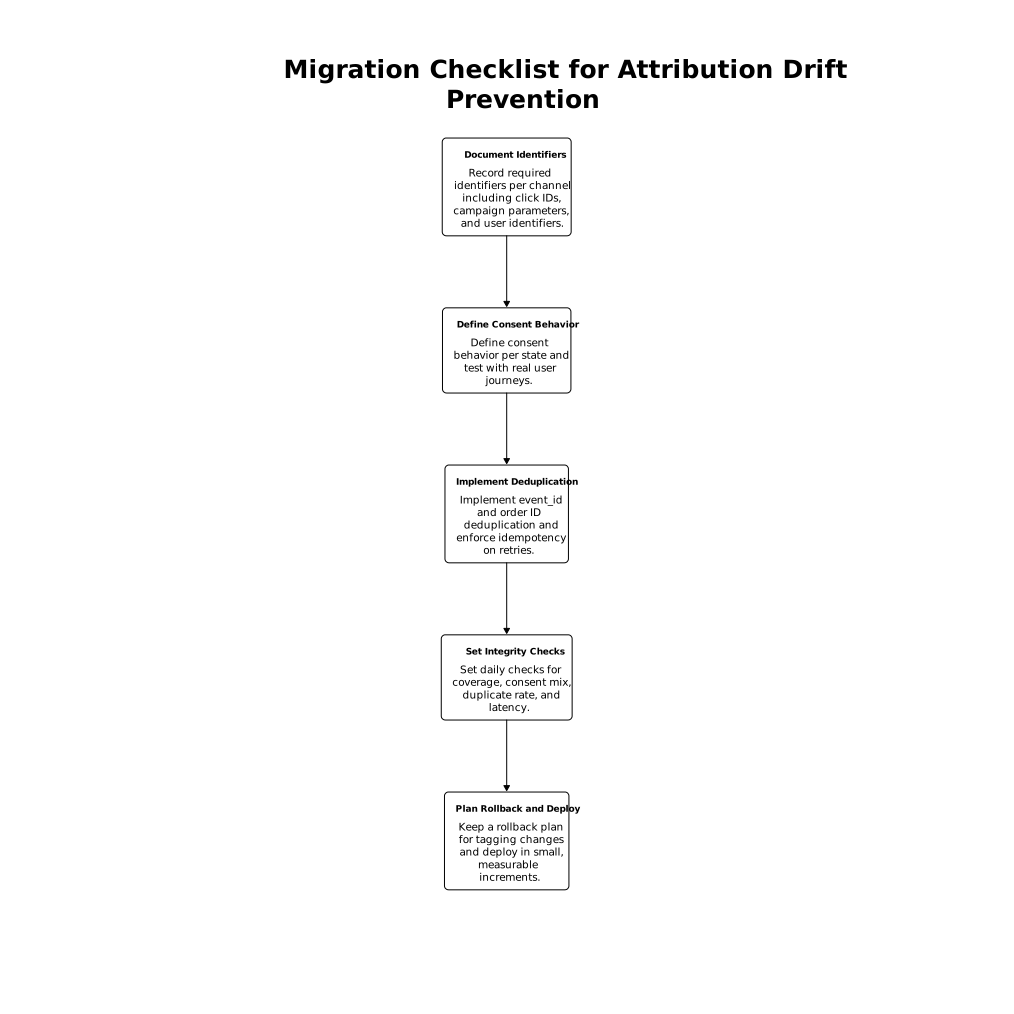
A migration checklist to prevent recurring attribution drift
- Document required identifiers per channel (click IDs, campaign parameters, user identifiers where permitted).
- Define consent behavior per state and test it with real user journeys.
- Implement event_id and order ID deduplication and enforce idempotency on retries.
- Set daily integrity checks (coverage, consent mix, duplicate rate, latency).
- Keep a rollback plan for tagging changes and deploy in small, measurable increments.