
Why enterprise customers hold back in public feedback channels
Most product teams want “real requests”: specific problems, constraints, and examples. Enterprise users often want the same thing, but they filter what they share. The reason isn’t stubbornness; it’s risk. A single comment can expose internal security posture, vendor architecture, regulated workflows, or contractual obligations. When the default feedback space is fully public, users learn to submit vague feature asks (“SAML improvements”) instead of the context needed to design the right solution (“we need separate IdP routing per subsidiary and SCIM group mapping by cost center”).
The “feedback paywall” is a design approach that removes that risk without shutting down collaboration. Instead of gating feedback behind money or access requests, it gates visibility behind roles. The result is a system where enterprise customers can share full context, while your broader user base still sees a healthy public portal and you avoid leaking roadmap details or sensitive operational information.
What a feedback paywall is and what it is not
A feedback paywall is role-based visibility layered onto your feedback workflow. It controls who can view, comment on, and receive updates about specific posts, categories, attachments, and status changes. The goal is to make it safe to share “security context” and “roadmap-intent context” while preserving the benefits of a public portal: discoverability, deduplication, and community validation.
It is not a replacement for good product communication. It doesn’t justify ambiguous statuses (“planned” forever) or eliminate the need for customer conversations. It simply creates the conditions where customers can be candid without worrying that competitors, auditors, or other departments will misinterpret what they shared.
Designing role-based visibility without breaking the feedback loop
Start with a clear visibility model
Most teams do better with a small set of visibility tiers rather than an overly granular matrix:
- Public: anyone can view; encourages discovery and self-serve voting.
- Authenticated: only signed-in users can view; reduces anonymous leakage and improves attribution.
- Account-private: only members of a specific customer account can view; ideal for enterprise security and workflow context.
- Internal: only your team can view; used for triage notes, pricing implications, and sensitive roadmap discussion.
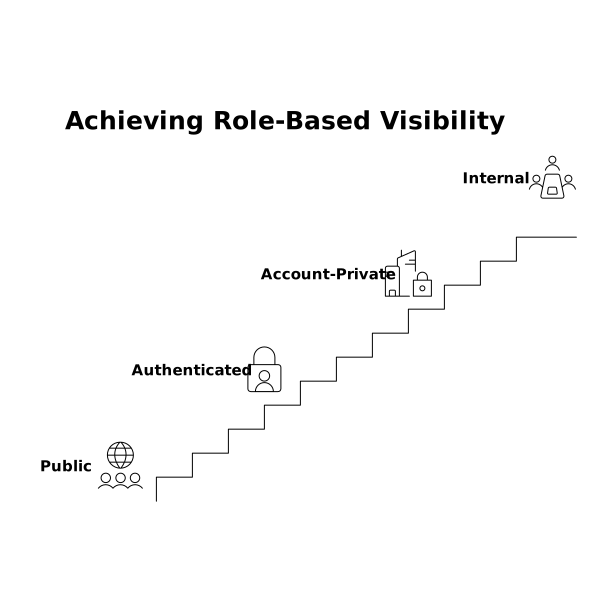
Keep the model consistent across objects: posts, comments, attachments, and updates. If a post is account-private but status updates are public, you’ll accidentally reveal intent. If the post is public but attachments are private, you’ll force customers to restate details in insecure ways.
Separate “request content” from “sensitive context”
A practical pattern is to split a single request into two linked layers:
- Public summary: the generic problem statement and desired outcome.
- Private context thread: environment details (IdP, logging requirements), screenshots, architecture notes, policy constraints, and timelines.
This preserves the public knowledge base (“Many teams want better SSO administration”) while allowing the enterprise buyer to add the details your engineers need. It also reduces duplicate posts because other users can find the public summary and add their vote without seeing confidential material.
Make roles reflect real enterprise structures
Enterprise accounts often have multiple personas who should not see the same things:
- Admins may need to discuss identity, audit logs, and provisioning.
- End users want UX and workflow improvements but shouldn’t see security exceptions.
- Executives care about timelines and outcomes, not implementation detail.
- Partners and contractors may have limited visibility by policy.
Design your portal so the same account can contain multiple roles, and ensure the UI makes the scope obvious. A simple label like “Visible to: Acme Corp (Admins)” reduces accidental oversharing.
Preventing roadmap leakage while still being transparent
Use status semantics that don’t force disclosure
Status is where teams leak the most. “Planned” can reveal a competitive direction; “In progress” can imply delivery dates; “Blocked” can expose security debt. Create a policy for public statuses versus private statuses. For public audiences, you can keep to outcome-oriented states (Under review, Investigating, Shipped). For account-private threads, you can add operational states (In design, Needs security review, Waiting on vendor).
When you do share timing, prefer ranges and conditions. “Targeting Q4 pending audit sign-off” is safer than “shipping Oct 12,” and it also sets more realistic expectations.
Let enterprise customers request private updates by default
Some customers don’t want their procurement or security concerns visible even inside their own org’s broader user base. Provide an option for updates that are restricted to specific roles (for example, only account admins), while still counting their votes toward demand.
Security context needs special handling
Classify the “sensitive” categories up front
Posts about SSO, SCIM, audit logs, data residency, encryption, permissions, and incident workflows almost always attract sensitive details. Pre-create categories where the default visibility is authenticated or account-private. This reduces the chance that an enterprise user accidentally publishes internal policies.
It can also help to provide structured fields rather than free text (IdP type, required attributes, log retention window). Structured collection reduces the amount of unnecessary disclosure and speeds up triage.
Don’t tie identity to persistent tracking you can’t justify
Role-based visibility depends on identity, but identity doesn’t mean you need cross-site tracking. If you’re measuring portal effectiveness, you can often do it without persistent IDs by focusing on aggregate behavior and session-level signals. The same mindset applies to trust: collect what you need to authorize access and route feedback, not more. For teams thinking through measurement tradeoffs, this piece on measuring returning visitor behavior without persistent IDs is a useful framework for privacy-aware instrumentation.
Operational workflow: how to run a paywalled feedback system day to day
Intake: capture requests where customers already talk
Enterprise feedback often starts in support tickets, CSM notes, call transcripts, and security questionnaires. A reliable workflow is to capture that input into a central system, link it to an account, and then choose the right visibility tier. Tools like canny.io are built for this kind of centralized feedback management: collecting requests from a public portal and internal tools, segmenting demand, and keeping users informed with controlled visibility.
Deduplication: merge without exposing private context
When two customers ask for the “same feature,” their context can differ dramatically. Merge the public summaries, but keep private context threads separate by account. This avoids accidental disclosure and prevents the most common enterprise failure mode: a “combined thread” where one company’s security requirements become another company’s blueprint.
Triage: score and prioritize while maintaining confidentiality
Scoring by segment and revenue is valuable, but the score itself can be sensitive if it implies deal terms. Keep internal scoring private, and expose only what users need: that you’re reviewing, investigating, or shipping. Internally, maintain a clear audit trail of why a request is prioritized (risk, retention, compliance), but publish only the parts that are appropriate.
Communication: publish release notes without overpromising
When a sensitive request ships, release notes should focus on customer outcomes and safe implementation detail. If you need to share deeper configuration guidance (for example, an audit log schema or permission model), publish it in documentation behind authentication or in account-private updates.
Common pitfalls and how to avoid them
- Over-restricting everything: if all feedback becomes private, you lose discovery and duplicate prevention. Keep public summaries whenever possible.
- Mixed visibility within one thread: avoid situations where a public commenter can reply to an account-private post via email notifications or integrations.
- Ambiguous permissions: users need to know what will be visible before they hit “Post.” Make visibility explicit at creation time.
- Letting AI amplify sensitive text: if you use summarization or auto-replies, ensure it respects visibility boundaries so private details never appear in public summaries. For teams thinking about how language and associations impact perception, the discussion of negative entity co-occurrence and AI shortlists is a reminder that context can travel in unintended ways.