
Designing rollbacks before the first deploy
AI-generated apps move fast, which is exactly why rollback strategy has to be part of your default project template. In a React + Supabase stack, the real risk isn’t just a broken UI—it’s a schema change that silently corrupts production assumptions, a bad RLS policy that blocks users, or an edge function deployed with the wrong environment variables.
A GitHub-first approach makes rollback boring and repeatable: every change is tracked, every deploy can be traced to a commit SHA, and you can roll back code and database state with a known procedure. Platforms like lovable.dev fit naturally into this workflow because you can iterate quickly while keeping the project synced to GitHub from day one, which is the foundation for reliable, automated reverts.
Three rollback layers you need in React + Supabase
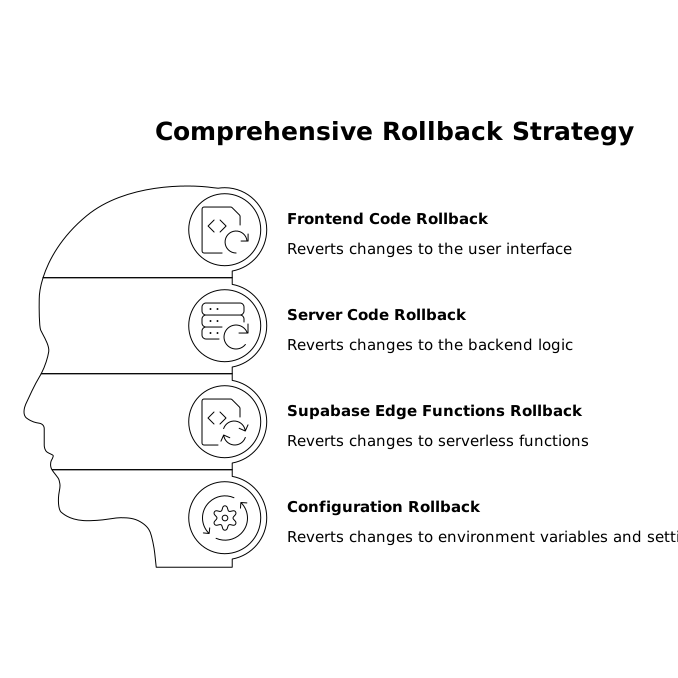
1) Frontend and server code rollbacks
This includes your React app, API routes (if you have them), Supabase Edge Functions, and any config in the repo. Code rollbacks are the easiest layer when you use immutable deploys: each deployment corresponds to a commit, and reverting means redeploying a previous commit.
- Golden rule: treat “main” as production, protect it, and only deploy from it.
- Traceability: your hosting provider should expose the deployed commit SHA.
- Configuration: keep environment variables versioned as templates (e.g.,
.env.example) and document which secrets belong to which environment.
2) Database schema rollbacks
Supabase is Postgres. Schema changes are often the hardest to roll back because “down” migrations can be destructive or ambiguous (dropping columns, rewriting types, backfilling, etc.). The goal is not to “undo everything perfectly,” but to ensure you can return to a known-good state quickly without guessing.
- Use migrations: keep SQL migrations in the repo and apply them through CI or a consistent CLI process.
- Prefer additive changes: add new columns/tables first; deprecate old ones later.
- Feature flags over schema flips: ship code paths that can handle both old and new schema during a transition.
3) Data state rollbacks
Even with perfect migrations, the real “oops” moment is data: a job that updates 10,000 rows incorrectly, a new trigger that cascades deletes, or a policy change that exposes or blocks data unexpectedly. This is where backups and point-in-time recovery (PITR) matter.
A practical rollback plan defines:
- What gets backed up (full DB, schema-only, data-only, storage buckets if applicable).
- How often and where backups live.
- Who can restore and how restores are audited.
Preview channels as your primary safety net
Preview channels reduce rollback frequency by catching failures before production. The pattern is simple: every pull request gets a deployable environment that mirrors production as closely as possible.
What a preview channel should include
- Isolated frontend deployment tied to the PR commit.
- A dedicated Supabase project (ideal) or a dedicated schema/database for preview (acceptable if you have strict isolation).
- Seeded test data that resembles production shapes, including edge cases.
- Automated checks for migrations, RLS, and basic user flows.
For teams that are moving quickly, the most common failure mode is preview environments drifting from production. Use a single source of truth for migrations and seed scripts, and treat preview DB creation as an automated step, not a manual ritual. The same discipline you apply to concurrency and throttling in automation systems also applies here: reduce shared mutable state and enforce predictable workflows (a helpful mindset if you’ve implemented distributed locks and backpressure elsewhere).
How to keep preview DBs consistent
- Build DB from migrations on every preview spin-up.
- Apply seeds idempotently (safe to run multiple times).
- Run smoke tests that verify login, CRUD, and key RLS rules.
Database backups and restore drills that actually work
A backup you’ve never restored is a hope, not a strategy. In Supabase/Postgres, your rollback plan should specify a restore path for three scenarios:
- Schema mistake: migration applied incorrectly.
- Data mistake: update/delete job went wrong.
- Security mistake: RLS/policy change exposed or blocked access.
Recommended baseline
- Automated daily backups (or more frequent depending on your write volume).
- Retention policy that matches your business needs (e.g., 7–30 days).
- Pre-migration snapshot for any risky change (type changes, constraint rewrites, large data backfills).
Restore drills
Schedule a restore drill monthly or quarterly. The drill should restore a backup into a non-production environment, run migration verification, and run application smoke tests. This is the only way to validate that your backups include everything you expect (including extensions, functions, and required roles) and that your team can execute the procedure under time pressure.
One-command reverts with GitHub Actions
“One command” doesn’t literally have to be a single shell command typed into a terminal. In practice it means: a single, standardized operation that reliably takes you back to a known-good release without ad hoc steps. For most teams, that’s a GitHub Actions workflow dispatch that you trigger from the UI.
What the revert workflow should do
- Select a target release (tag or commit SHA) and an environment (preview/staging/production).
- Redeploy code from that SHA (frontend + functions).
- Apply DB action based on the incident type:
- Schema-only: roll forward with a fix migration (preferred).
- Data corruption: restore from snapshot/PITR into a recovery DB, then promote/swap if your platform supports it.
- Security/RLS: redeploy previous SQL policy set and run a policy verification test.
- Invalidate caches (CDN, edge caches) if your hosting uses them.
- Post a deployment note to your incident channel with the release reference and outcome.
Tags and release discipline
Use annotated tags like prod-2026-07-02-1 for each production deploy. This makes the rollback target unambiguous, especially when multiple commits land quickly. Also store a small RELEASE.md entry that maps tag → notable changes → migration IDs applied.
RLS and auth regressions deserve dedicated checks
In Supabase apps, “it works locally” can still mean “nobody can read anything in production” if RLS differs, JWT claims differ, or policies were edited without tests. Add a lightweight policy test suite that validates the core roles in your app (anonymous, authenticated, admin/service) against key tables.
If your team already values structured process for daily execution, borrow the same habit: a short, repeatable sweep of what changed and what could break. A calendar-style sweep method can help keep these checks schedulable as part of your cadence rather than an occasional cleanup.
Related: an anti-backlog calendar sweep that keeps daily tasks schedulable.
Putting it together as a default template
A GitHub-first rollback strategy for AI-generated React + Supabase apps is a set of defaults:
- Preview channels per PR with isolated environments.
- Migrations in-repo with additive changes favored.
- Automated backups plus restore drills.
- A single revert workflow that redeploys a prior release and triggers the right DB recovery path.
- Policy checks for RLS/auth regressions.
When you build this into your project from the start—especially in fast iteration environments like lovable.dev—rollbacks become an operational routine instead of a stressful improvisation.