
Why Promotions placement changes during warmup
Gmail’s tabbed inbox is often treated like a passive filter: you send an email, Gmail decides “Primary” or “Promotions,” and that’s the end of the story. In practice, tab assignment behaves more like a moving classification model that reacts to patterns in your sending and engagement. During an email warmup, those patterns are intentionally changing. That’s why early “Promotions” placement isn’t neutral—it can create a feedback loop that shapes future placement and, in edge cases, overall trust signals.
Warmup is meant to build reputation gradually through consistent, positive interactions. But if your early warmup traffic resembles marketing mail (templates, links, tracking, uniform sending windows), Gmail can learn the wrong “category identity” for that mailbox or domain. Once that identity is established, it can take longer to earn Primary placement even when your content is genuinely person-to-person.
What “neutral” would mean and why Gmail isn’t
“Neutral” would imply that tab placement is merely cosmetic—an organizational choice with no downstream impact. Gmail is not designed that way. Tabs are a product surface optimized for user experience and relevance. When Gmail sees engagement patterns that match typical promotional email behavior, it routes messages accordingly. Those routes affect what users notice, open, reply to, and act on, which then becomes the next set of signals Gmail learns from.
So Promotions isn’t a penalty in the same way spam is, but it isn’t impact-free either. During warmup—when you have limited data and small sample sizes—small shifts in engagement can become disproportionately influential.
Category drift during warmup and how it happens
Category drift is the gradual change in where Gmail classifies your messages as your sending behavior evolves. During warmup, drift is common because you are introducing a new pattern: more frequent sending, broader recipient variety, and new types of content. Drift becomes problematic when your warmup creates a “marketing-like” signature that Gmail then applies to later email, including outreach or customer communication that you’d prefer to land in Primary.
Common warmup behaviors that push messages into Promotions
- Template uniformity: the same structure, phrasing, and formatting repeated across many messages.
- Link-heavy content: multiple links, tracking parameters, or branded CTAs in early messages.
- HTML-first sending: polished layouts, buttons, or image blocks before your mailbox has a history of conversational email.
- Highly regular send timing: emails sent in predictable bursts that look automated.
- Recipient behavior mismatch: opens without replies, or very fast “engagement” that doesn’t look human.
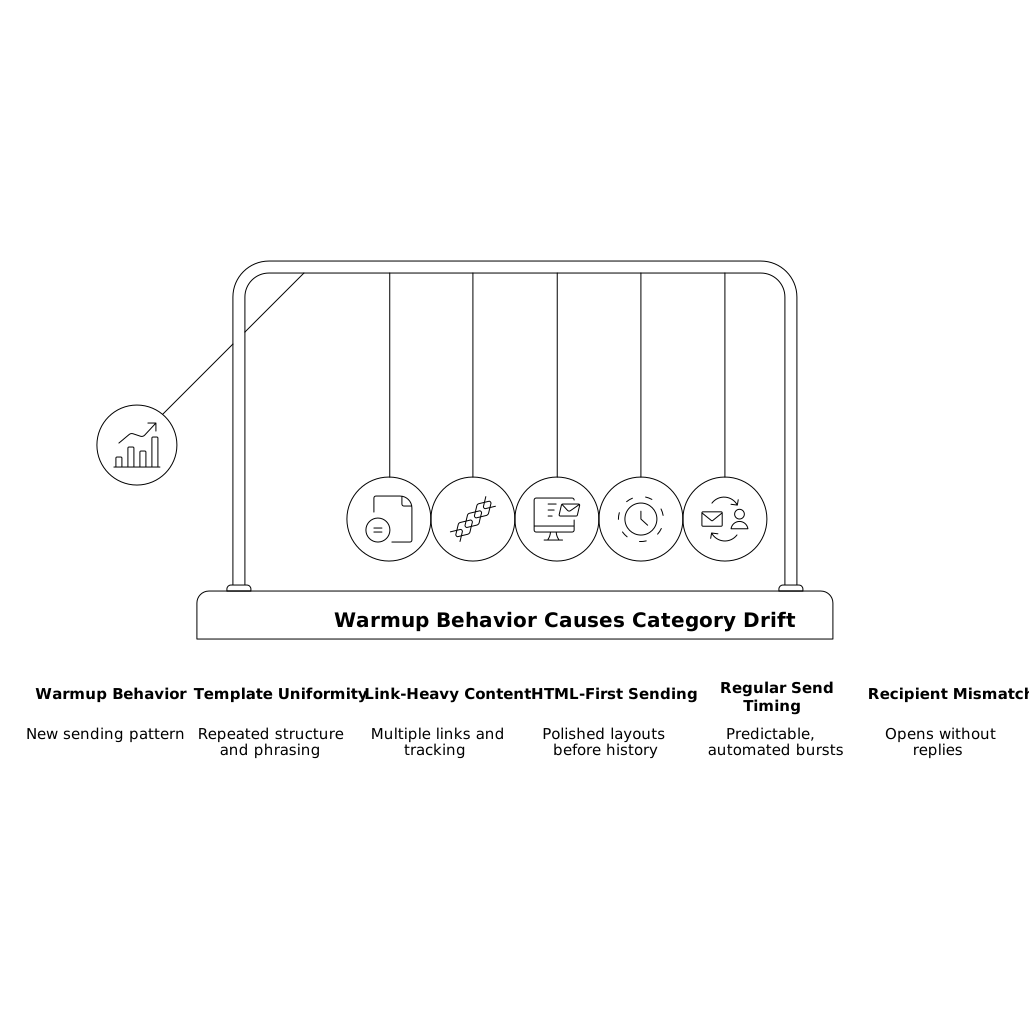
None of these automatically harm deliverability. The issue is that, during warmup, Gmail is forming a baseline expectation of what your mail “is.” If that baseline is promotional, it can stick.
Why Promotions placement can influence reputation signals
Sender reputation isn’t a single score, and Gmail doesn’t publicly disclose a “tab reputation.” Still, the mechanics of warmup mean classification and engagement can reinforce each other. Promotions placement can reduce visibility compared to Primary for some users, which can reduce organic replies and meaningful reading time. That can nudge the engagement profile toward shallow signals (quick opens, low replies), which in turn makes the mail look even more like bulk marketing.
During warmup, you want Gmail to observe a healthy mix of behaviors associated with human-to-human communication: reading, replying, occasional forwarding, and normal variability in timing. If your warmup produces a narrow engagement pattern, you risk training the wrong model expectations.
How to stabilize tab placement without gaming Gmail
The goal is not to “trick” Gmail into Primary at all costs. The goal is stability: consistent classification aligned with the true nature of your mail stream. For sales outreach, recruiting, partnerships, and customer communication, that often means building a conversational footprint first, then gradually introducing richer content.
1) Start with truly conversational messages
Early warmup messages should look like real correspondence. Keep formatting simple, avoid heavy branding, and prioritize natural language. Replies matter because they are a strong indicator of relationship-driven email. If you need to include links, do it sparingly and not in every message.
2) Introduce marketing elements gradually
If your long-term sending includes newsletters, product updates, or lifecycle sequences, introduce those attributes in phases. For example, move from plain text to light HTML, then add one link, then add richer layouts. Sudden jumps in complexity can create abrupt category drift.
3) Avoid over-automation fingerprints
Warmup should include variability: different subject lines, different message lengths, different send times, and a realistic pace. If everything is uniform, Gmail’s classifiers have fewer cues that the stream is human. A good warmup process simulates natural behavior without producing patterns that look manufactured.
4) Keep identity signals consistent
Authentication (SPF, DKIM, DMARC) should be stable, and your “From” identity should be consistent with your use case. Switching domains, changing display names frequently, or rotating too many sender personas during warmup can add noise and slow stabilization.
5) Watch for “drift triggers” when scaling volume
The most common time for tab placement to shift is when you increase volume. If you go from a handful of daily messages to a larger cadence, do it in steps and monitor placement and engagement at each step. Treat it like product instrumentation: one change at a time, then observe.
Where warmup platforms fit in
Warmup is operationally hard to do well because it requires consistency, scale, and engagement patterns that look authentic across providers. Platforms such as mailwarm are designed to automate the gradual reputation-building process by generating realistic engagement signals across major inbox providers, while maintaining a pace that supports inbox placement over time.
The practical advantage of a structured warmup approach is control: you can avoid abrupt pattern changes and reduce the chance that early sending teaches Gmail the wrong category identity.
What to measure to confirm stability
You don’t need perfect attribution to diagnose drift—you need a small set of consistent indicators.
- Placement sampling: check a representative set of Gmail recipients and note Primary vs Promotions trends over time.
- Reply rate during warmup: replies are a stronger stabilizer than opens alone.
- Content deltas: track when you introduced links, HTML, images, or new templates and correlate with placement changes.
- Volume steps: record when daily send volume increases and watch for classification shifts in the following days.
If you’re also trying to understand measurement in environments where identification is limited, the approach used to interpret partial signals can be similar to methods discussed in measuring returning visitor behavior without persistent IDs, where trend quality matters more than single-point certainty.
How to recover if you’ve “trained” Promotions too early
If your mailbox is consistently landing in Promotions during warmup, stabilization is usually possible, but it requires discipline:
- Reduce template similarity: diversify copy and structure.
- Temporarily simplify: move back toward plain text, fewer links, and fewer promotional cues.
- Increase meaningful interaction: prioritize threads that produce real replies and longer reading time.
- Scale more slowly: avoid large volume jumps until placement stops swinging.
Think of it as rebuilding a baseline. Once Gmail sees consistent conversational patterns and stable engagement, tab placement typically becomes more predictable—and that predictability is what supports long-term sender reputation.